Showing posts with label Jailbreak Iphone. Show all posts

Friday, March 18, 2011

Sn0wbreeze 2.3b2 to Jailbreak iOS 4.3 Release with Bug Fixes [Video Guide]

0 comments

Myads

Sn0wbreeze 2.3b2 has just been released to jailbreak iOS 4.3 on iPhone 4, 3GS, iPod touch $G, 3G and iPad. Sn0wbreeze 2.3b2 allows you to enable Multitouch Gestures, patch the security hole (Mobile Substrate) and some new improvements.


What's new on Sn0wbreeze 2.3b2:
  • Adds Multitasking Gestures option in Settings App.
  • iBooty bug fixes (Includes iBSS issues).
  • iBooty is EVEN faster.
  • MobileSubstrate is now working.
  • Sleep bug in iPod Touches is fixed.
  • Rare iPad 1G issues resolved.
  • Added iREB to top bar for future re-runs within sn0wbreeze.
  • ultrasn0w is STILL broken! Unlockers STAY AWAY!
How to use Sn0wbreeze 2.3b2 to jailbreak iOS 4.3 on iPhone 4, 3GS, iPod touch 4G, 3G and iPad  [video guide] thanks Dino:


Important note: Sn0wbreeze 2.3b2 is a tethered jailbreak on iOS 4.3. If you rely on ultrasn0w unlock, you should stay away from it as iOS 4.3 still can't be unlock even with Gevey SIM.

Download Sn0wbreeze 2.3b2 for Windows.
MIRROR: sn0wbreeze-v2.3b2.zip - 15.3 MB
source

More Post:

Monday, March 14, 2011

iPad 2 has been jailbroken [1st Pic]

0 comments

Myads

Everybody, Good news, Comex has done what he does best and has jailbroken Apple’s latest device. Comex is yet to say when the jailbreak will made public, and how it works, but we now at least know the iPad 2 is able to be jailbroken.


More Post:

Friday, March 11, 2011

Untethered Jailbreak May be Delayed Until iOS 4.3.1 Release

0 comments

Myads

After we have showed you the untethered jailbreak demo video for iOS 4.3 few hours ago, the hacker behind the exploit seemingly will hold his jailbreak until Apple releases iOS 4.3.1.
With Apple already baking 4.3.1 the first one releasing an iOS 4.3 jailbreak will pretty much burn the exploit :P
Well Apple should release 4.3.1 very soon, because tomorrow everybody knows that @0xcharlie popped an iPhone 4 at #pwn2own through Safari.
How he justify this ? the hacker expected that Apple should release iOS 4.3.1 specially after the hackers (at Pwn2Own contest) has successfully hacked iPhone 4 via vulnerability which found in Mobile Safari running iOS 4.2.1. Although the vulnerability is also exist on iOS 4.3, but all iOS devices running iOS 4.3 are safe until hackers find a way to bypass the ASLR (Address Space Layout Randomization) which has been implemented by Apple starting form iOS 4.3.

The winners of Pwn2Own have mentioned that it's difficult to bypass ASLR security in iOS 4.3, so I don't expect that Apple will release a new firmware for patching exploit didn't discovered yet, I think this is the logic.

According to the above, I don't think this is a good decision to hold iOS 4.3 untethered jailbreak.


More Post:

Friday, February 18, 2011

How to Jailbreak Apple TV 2G 4.2.1 with Greenpois0n

0 comments

Myads

You can follow this guide to jailbreak Apple TV 2G running iOS 4.2.1 using Greenpois0n, this guide is for Windows users, but you also can follow the same guide on your Mac OS X.

Step 1:
Download Greenpois0n for Windows, and then open it (download links at the end).

When asked if you are jailbreaking the Apple TV click Yes.


undefined

Step 2:
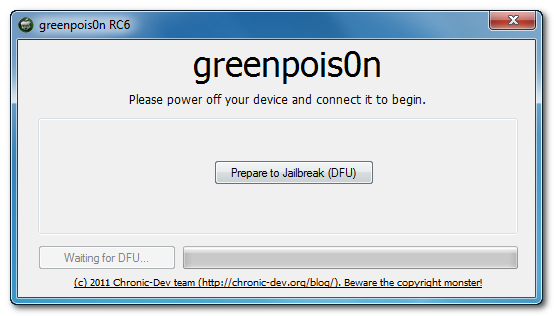
Disconnect your Apple TV from the power and USB then click on "Prepare to Jailbreak (DFU)" button

undefined

Step 3:
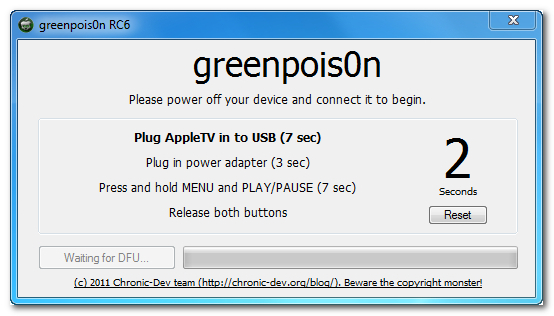
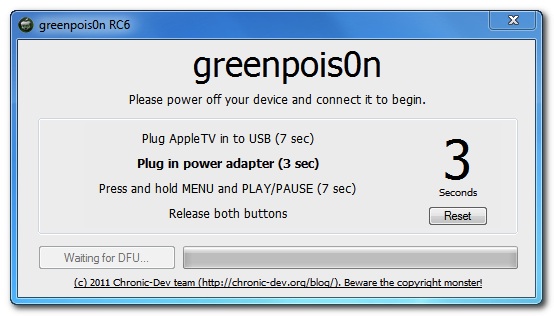
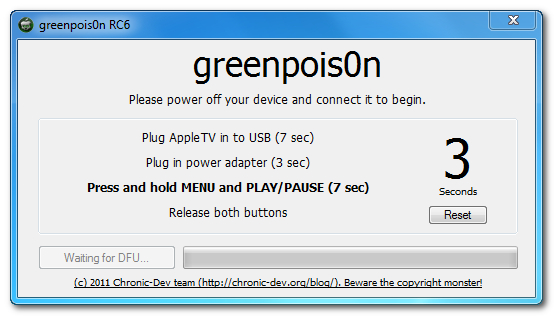
Follow the next simple steps to place your Apple TV into DFU mode.

Connect the USB cable immediately.


After 7 seconds connect the power cable.


Press the Menu and Play/Pause buttons for 7 seconds

undefined

Release the buttons.

Step 4:
Once your Apple TV is successfully in DFU press the "Jailbreak" button to begin jailbreaking.

undefined


undefined

Step 5:
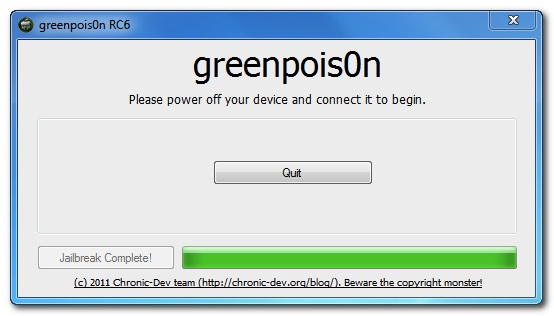
Once the jailbreak is complete you can press the "Complete" button. 


Important Note: Make sure to wait 40 seconds before disconnecting the USB cable so the jailbreak process can finish up on the device.

undefined
Download Greenpois0n RC6.1 Windows
Download Greenpois0n RC6.1 Mac
Download iOS 4.2.1 for iPhone, iPod touch and iPad

More Post:

Greenpois0n RC6.1 Released with iBooks Fix

0 comments

Myads

Few minutes ago, Chronic Dev Team has just successfully updated their jailbreak tool to Greenpois0n RC6.1 for both Mac OS X and Windows. This version has successfully patched with iBooks fix. For who don't know, many users have problems with iBooks after jailbreaking iOS devices with Greenpois0n.

How to know that you have been infected? If you saw this message “There is a problem with the configuration of your iOS Device. Please restore with iTunes and reinstall iBooks“ so your iOS device has been infected.

How to solve? You have to restore your iOS device and re-run Greenpois0n RC6.1 jailbreak again, you can follow our step by step guide posted here.

Download Greenpois0n RC6.1 Windows
Download Greenpois0n RC6.1 Mac
Download iOS 4.2.1 for iPhone, iPod touch and iPad

More Post:

Wednesday, February 16, 2011

Sn0wbreeze 2.2 Jailbreak 4.2.1, Preserve Baseband, UltraSn0w Unlock [Video Guide]

0 comments

Myads

iH8sn0w has just released Sn0wbreeze 2.2 (aka PwnageTool for Windows), Sn0wbreeaze 2.2 will allow you to jailbreak iOS 4.2.1 for iPhone, iPod touch and iPad by creating custom firmware. Sn0wbreeze 2.2 is also based on Greenpois0n exploit.

The main value of Sn0wbreeze 2.2 is the capability of preserving the unlockable baseband with the new feature "Baseband Preservation Mode", which allows you to jailbreak iOS 4.2.1 and unlock your iPhone 4, 3GS and 3G with the existing version of ultrasn0w.

Supported devices:
  • iPhone 4, 3GS, 3G
  • iPod touch 4G, 3G, 2G
  • iPad
How to use Sn0wbreeze 2.2 video guide:


Download Sn0wbreeze 2.2 for Windows
Download iOS 4.2.1 for iPhone, iPad, iPod touch
Download .NET Framework 3.5 (required to run Sn0wbreeze)


original link

More Post:

sn0wbreeze v.2.2

0 comments

Myads

sn0wbreeze 2.2 is now out.

,sn0wbreeze is an application that will allow you to create custom iOS ipsw that you can use to restore any iOS device. sn0wbreeze is the windows counterpart of pwnage tool for mac. sn0wbreeze 2.2 supports 4.2.1 ipsw.

,below is the screenshot of how to create a custom 4.2.1 ipsw..

1. open sn0wbreeze and click on the blue arrow


2.click on browse


3. select your 4.2.1 ipsw


4. now sn0wbreeze will identify your selected 4.2.1 ipsw


5. after sn0wbreeze finished identifying your ipsw, click on the blue arrow


6. now you will be presented with three options, Baseband Preservation mode, Simple Mode, and Expert Mode. The "Baseband Preservation mode" option is the newest option added in this latest version of sn0wbreeze.


7. you can hover above any of the three options to see what each option does as seen on the screenshot below..


8. now for the purpose of this how to i choose "expert mode" and click on the blue arrow. note: you can experiment and choose any of the three options if you want.


9. select general and click the blue arrow


10. if you want to also hacktivate the iphone just leave "Activate the iPhone" option checked. you can also leave the "install animated boot logos" option checked if you want an animated sn0wbreeze logo. you can also enable the "install SSH" option to install SSH in your iPhone. for the purposes of just creating a customized and hacktivated ipsw, i just leave the default checked options and click on the blue arrow


11. now if you want to load custom apps, just select the apps you wanted loaded. otherwise just click the blue arrow


12. now click on "Build IPSW" and click the blue arrow


13. here again you will be presented with another option that is new to the latest version of sn0wbreeze. you can click on "Pacman" if you want to play pacman game while waiting for the sn0wbreeze to finish. otherwise just click on "No,thanks.." option.


14. now let sn0wbreeze to do its thing..


15. here as you can see it is also loading cydia...


16. wait for sn0wbreeze to show this..


17. finished creating customized ipsw. the created ipsw is located on your desktop.


,credits to ih8sn0w for the latest sn0wbreeze.

download here:  http://ih8sn0w.com/index.php/welcome.snow

mirror:
sn0wbreeze-2.2-final.zip - 15.6 MB

More Post:

Tuesday, February 15, 2011

PwnageTool 4.2 Untethered iOS 4.2.1 Jailbreak Released [How to Guide]

0 comments

Myads

Dev Team has just released PwnageTool 4.2 to untethered jailbreak for all devices running iOS 4.2.1 with the help of Greenpois0n exploit. As you know PwnageTool is a Mac OS X tool, this version support all iOS devices except iPod touch 2G.

Supported device:
  • iPhone3G
  • iPhone3GS
  • iPhone4
  • iPhone4-Verizon
  • iPod touch 3G
  • iPod touch 4G
  • iPad
  • AppleTV 2G
Important note: If you rely on ultrasn0w unlock, you MUST use this version of PwnageTool which creates custom 4.2.1 firmware with preserving the unlockable baseband to be able to unlock your iPhone again using ultrasn0w 1.2

You can jailbreak your iOS device running iOS 4.2.1 using PwnageTool 4.2 by following our previous guide posted here.

Note: In the above guide you Must use PwnageTool 4.2 and select iOS 4.2.1 IPSW.

Download PwnageTool 4.2 for Mac
Download iOS 4.2.1 for all iPhone, iPod touch, iPad and Apple TV 2G

 link

More Post:

Comex Fixes iBooks Crashes After iPhone, iPod Touch, iPad Jailbreak

0 comments

Myads

Comex,the guy behind Spirit, JailbreakMe and some untethered exploits, has just find a way to fix iBooks crash which occurs after jailbreaking you iOS device, if you saw this message “There is a problem with the configuration of your iOS Device. Please restore with iTunes and reinstall iBooks“ so your iOS device has been infected.


Comex has announced about this via his twitter by some techy words, anyway it's expected that Comex will embed some new patches on the upcoming jailbreak tools to fix these crashes.

More Post:

Sn0wbreeze 2.2 r1 iOS 4.2.1 Jailbreak with Preserving Baseband 1.59.00 [Screenshots]

0 comments

Myads

Sn0wbreeze 2.2 r1 screenshots. I've received some screenshots of Sn0wbreeze 2.2. As you know Sn0wbreeze 2.2 will bring untethered jailbreak for iOS 4.2.1 with custom firmware and it's the PwnageTool alternative tool for Windows, as we reported you earlier Sn0wbreeze will allow you to jailbreak iOS 4.2.1 with preserving the unlockable baseband to be able to unlock it with the existing version of ultrasn0w.


You can notice on the above screenshot the new option "Baseband preservation mode" which let you jailbreak you iPhone with preserving the unlockable baseband.

You also will be able to installing custom boot logo and playing Pac-Man while creating your custom firmware. It's also rumored that Sn0wbreeze 2.2 will be released after the publication of Greenpois0n RC6 source code.

link

More Post:

Saturday, February 12, 2011

Greenpois0n RC6 Download Available Untethered iOS 4.2.1 [Windows / Mac]

0 comments

Myads

Chronic Dev Team has just released a new version of greenpois0n which allows you to jailbreak Apple TV 2G. Greenpois0n RC6 now available for both Windows & Mac machines that untethers Apple TV 2G jailbreak on iOS 4.2.1.

To be able to untether iOS 4.2.1 on Apple TV 2G, you have to follow the step by step guide posted here and you'll get Apple TV 2G untethered jailbroken on iOS 4.2.1. Download links of greenpois0n RC6 below:

Download Greenpois0n RC6 for Mac OS X
Download Greenpois0n RC6 for Windows
Download iOS 4.2.1 for Apple TV 2G

MIRROR:


gp_mac_rc6_final.zip - 6.3 MB
gp_win_rc6_final.zip - 2.1 MB

More Post:

Tuesday, February 8, 2011

new update greenpois0n RC5b4 released.

0 comments

Myads

Download: GreenPois0n

Mirror:
gp_mac_rc5_b4.zip - 1.1 MB
gp_win_rc5_b4.zip - 1.1 MB


*** greenpois0n 1.0 RC5 ***

> Definition of the software:

greenpois0n will Jailbreak your iDevice.

> Supported iDevices:

- iPod Touch 2G (all bootroms)
- iPod Touch 3G
- iPod Touch 4G
- iPad 1G
- iPhone 3Gs (all bootroms)
- iPhone 4
- iPhone 4 Verizon

> Changelog:

- RC5.4: Verizon iPhone 4 is now supported !

> Requirements (check this !)

- a supported device (see above)
- the device should run iOS 4.2.1. Please check on the device in the Settings -> General -> About page.
If your device is running an older version, please upgrade iOS first using iTunes.
*** If you want to SIM Unlock, preserve your baseband using TinyUmbrella ***
- at least Windows XP
- a working internet connection

> Notes (checks this also !)

- if your device is jailbroken with iPhone Dev Team's Monte, please restore to fresh 4.2.1. first
- if Cydia doesn't show up after Loader, you may need to reboot the device
- this version of greenpois0n doesn't include a patched activation system. You'll need to activate your device using iTunes
- WE DO NOT SUPPORT PIRACY !

> Instructions

1. plug the device to your computer using the USB cable
2. quit iTunes if it shows up
3. start greenpois0n.app
4. follow instructions
5. the device will boot a 1st time with verbose text on screen. This operation will install the jailbreak on the device.
6. the device will reboot normally
7. start the Loader application (green icon on the SpringBoard), and follow instructions to install Cydia

> In case of troubles

1. check if somebody had the same issue : Jailbreak QA
2. join us on IRC : irc.chronic-dev.org #greenpois0n

> Source code

greenpois0n public source repositories will be updated soon

> Credits (alphabetical order)

Chronic-Dev Team (follow us on twitter):
- AriX : @AriX
- chronic : @chronic
- DHowett : @DHowett
- jan0 : @0naj
- Jaywalker : @Jaywalker9988
- OPK : @iOPK
- pod2g : @pod2g
- posixninja : @p0sixninja
- semaphore : @notcom
- westbaer : @westbaer

Contributions: chpwn, comex, geohot

People who helped (thank you!): GreySyntax, iH8sn0w, LunchBox, pod3g, ven000m (if you're not here and you think you deserve, it's certainly a mistake, tell us)

> Donations:

Donations are always greatly appreciated and will permit to buy new devices to make tests for future jailbreaks. ( GreenPois0n )

More Post:

Sunday, February 6, 2011

Greenpois0n RC5 Windows Download to Jailbreak iOS 4.2.1 iPhone, iPod Touch and iPad

0 comments

Myads

Finally Greenpois0n for Windows available, Chronic Dev Team has just released Greenpois0n RC5 for Windows to untethered jailbreak for iOS 4.2.1 for iPhone 4G, 3GS, iPod touch 4G, 3G, 2G and iPad.

greenpois0n rc5 win.exe - 590.3 KB
Download GreenPois0n for Windows [Mirror]
Download iOS 4.2.1 for iPhone 4, 3GS, iPod touch 4G, 3G, 2G and iPad

link

More Post:

Thursday, February 3, 2011

GreenPois0n RC5 Jailbreak will Support Custom Animated Boot Logo (Video)

0 comments

Myads

Greenpois0n RC5 new feature. Chronic Dev Team has just confirmed that the upcoming Greenpoi0sn RC5, which will bring untethered jailbreak for iOS 4.2.1, will support animated boot logo on all iOS devices.

It was confirmed that Greenpois0n RC5 will be released very soon supporting all devices on iOS 4.2.1 and won't support iOS 4.3. Check the video below:


http://www.youtube.com/watch?v=T3NYPVT13xw&feature=player_embedded

More Post:

GreenPois0n Untethered Jailbreak Stuck with iOS 4.3

0 comments

Myads

Greenpois0n and iOS 4.3. It seems that GreenPois0n untethered jailbreak will be available very soon as announced by iPhone hacker pod2g, Apple has closed the loophole hackers have been using up until iOS 4.3.

The good point is that because of this (and the fact that Apple fixed the kernel exploit in 4.3), we’re all working back on releasing gp.
So GreenPois0n RC5 will be released very soon for iOS 4.2.1 on all devices.

More Post:

New GreenPois0n rc4 Jailbreak 4.2.1 Untethered

0 comments

Myads


GreenPois0n rc4 is a multi-platform (meaning it works on Windows, Mac and PC) jailbreak for iPhone, iPod Touch, and iPad. It uses the Shatter exploit, and is a very simple and easy to use GUI jailbreak.

Stuff it works for:
iPhone 3GS ( new bootrom Untethered )
iPhone 3G - Untethered
iPod Touch 4G - Untethered
iPod Touch 3G - Untethered
iPod Touch 2G ( new bootrom Untethered )
iPad WiFi + 3G - both Untethered


             Download:               

                 Windows                  


Mirror:


More Post:

Followers

Archive


Cell Phone Repair. Copyright 2008 All Rights Reserved Revolution Two Church theme by Brian Gardner Converted into Blogger Template by Belajar Blog Bisnis Online